The KEGG pathways database
KEGG is the pathway database every PaintOmics job runs against. Its maps are drawn by hand and published together with the coordinates of everything on them, which is what makes a KEGG pathway paintable: PaintOmics puts your values into the boxes KEGG already drew.
The application describes it in Step 2, in the Multiple databases used card that appears when a job runs more than one database, as a database resource for understanding high-level functions and utilities of the biological system, such as the cell, the organism and the ecosystem, from molecular-level information — see kegg.jp/kegg.
KEGG is not optional
In Step 1 the KEGG checkbox is ticked, greyed out and tagged required, and the server adds KEGG to the job's database list whatever the form posted. Every job therefore has KEGG pathways, even one run for the sake of Reactome or MapMan. The other three databases are offered only when this server has installed them for the organism you chose.
What PaintOmics installs from KEGG
Installing an organism pulls two kinds of data.
Per organism:
- the list of that organism's pathways, and one KGML file per pathway — the machine-readable form of the map, which carries the position, width and height of every gene and compound box;
- the gene identifier tables the identifier translation works through;
- a pathway-to-pathway network, drawn in Step 3.
Shared by every organism on the server:
- the reference pathway images (
map00230.pngand so on) and their thumbnails; - the pathway classification, KEGG BRITE
br08901; - the compound list with every synonym KEGG records, the pathway-to-compound table, and a ChEBI-to-KEGG compound mapping.
The shared download is about 1.4 GB and each species adds roughly 200–400 MB. See Installing PaintOmics.
One further piece of KEGG is bundled with the application rather than
downloaded: the chemical classification of compounds, KEGG BRITE br08001,
which is what the metabolite class activity analysis groups by.
Why KEGG pathways can be painted
KEGG publishes both the picture and the geometry. The picture is the reference
map — one image per pathway, the same for every organism — and the geometry
comes from your organism's own KGML. When you paint mmu00230, PaintOmics
serves the image map00230.png and reads the box coordinates out of the mouse
KGML, so the diagram is KEGG's own drawing with your data laid over it, one box
per matched feature and one coloured cell per condition.
This is the same mechanism Reactome uses, from a downloaded PNG. MapMan works the same way from its own diagrams. OmniPath has no diagram at all and opens as an interaction network instead.
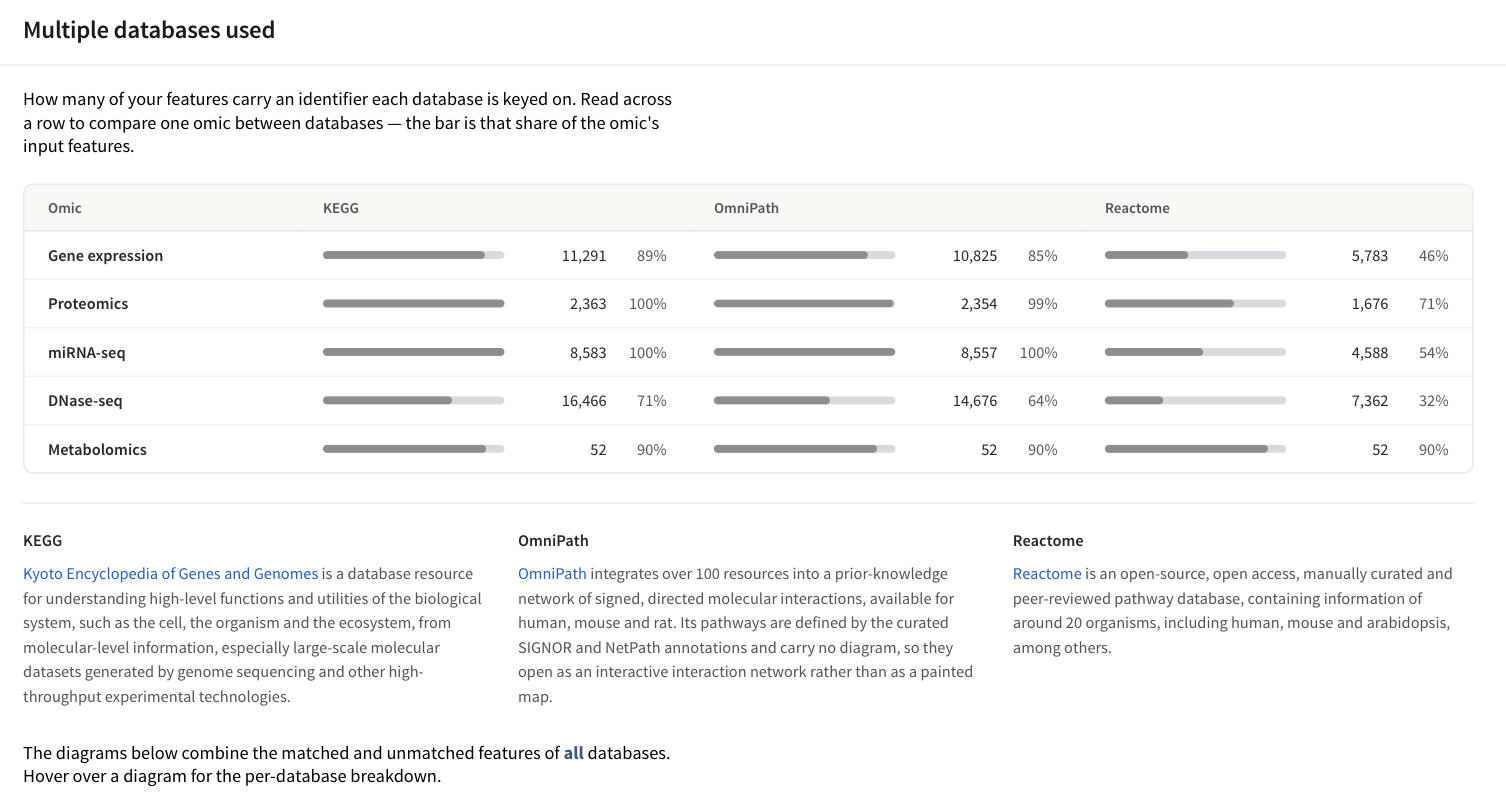
Step 2 counts, for each omic, how many of your features carry an identifier each database is keyed on. Reading across a row is how you find out why one database matched more of your data than another.
Identifiers
KEGG pathways name their genes with the organism's own KEGG gene identifiers, and PaintOmics translates whatever you uploaded into the identifier space that organism's data is keyed on. That target is per organism, not universal. The shipped configuration names 23 organisms and splits them in two.
- Ten resolve through NCBI Gene IDs: human, mouse, rat, cow, chimpanzee, green anole, chicken, Xenopus, pig and dog.
- The other thirteen resolve through KEGG's own gene ids: zebrafish, fly,
worm, budding yeast, S. pombe, P. falciparum, D. discoideum,
Bifidobacterium animalis subsp. lactis BB-12, tomato, potato,
Arabidopsis, and rice under both of the KEGG codes it has. Those two codes
spell a rice gene differently: KEGG names
osagenes by their NCBI Gene ID, anddosagenes by their RAP-DB locus (Os01g0147900). They are separate installations, so pick the one whose identifiers your file uses.
An organism with no entry in the shipped configuration falls back to KEGG gene ids and KEGG gene symbols.
Metabolites are matched against KEGG compound names, case-insensitively.
Bare KEGG compound ids (C00002) work because the installer files each id as a
name of itself, and ChEBI ids are accepted with or without the chebi: prefix.
A name that matches several KEGG compounds raises the disambiguation cards in
Step 2.
Supported identifiers has the per-organism detail.
Classification
Each KEGG pathway carries two classification levels taken from br08901: a top
level — Metabolism, Genetic Information Processing, Environmental Information
Processing, Cellular Processes, Organismal Systems, Human Diseases, Drug
Development — and a second level beneath it. Step 3 draws that as the Category Distribution pie and
the Filter by category tree; only classes that have pathways for your
organism appear. See Pathway classification.
Two analyses that are KEGG-only
Two things in Step 3 come from KEGG data and are unaffected by which other databases the job runs:
- the metabolite hub analysis, whose compound-gene graph is derived from the organism's KGML files;
- the metabolite class activity analysis,
whose chemical classes are the three levels of KEGG BRITE
br08001.
How KEGG compares with the others
| KEGG | Reactome | MapMan | OmniPath | |
|---|---|---|---|---|
| Offered for | every installed organism | 15 organisms in the shipped configuration | 4 plant organisms | human, mouse, rat |
| Can be switched off | no | yes | yes | yes |
| Pathway opens as | a painted KEGG map | a painted Reactome diagram | a painted MapMan diagram | an interactive interaction network |
| Genes keyed on | the organism's KEGG gene ids | Reactome gene ids | MapMan gene ids | UniProt accessions |
| Matches metabolites | yes | yes, through ChEBI | yes, through MapMan bins | no |
| Classification | KEGG BRITE br08901, two levels |
Reactome's event hierarchy, two levels | MapMan's own, two levels | assigned by PaintOmics, resource second |
Which of the four you can actually tick is a fact about the server you are using, not a fixed list. The Step 1 checkboxes are the authority: a database this deployment has not installed for your organism is disabled and labelled not installed.
Note
KEGG data is dated per organism. The administration panel shows the KEGG information date and the mapping date for every installed organism, and how many pathways your organism has is reported per job in the Step 3 summary band — not by any number quoted in this documentation.